Embed & share
read as.mdA deployed agent can meet people two ways: embedded as a chat widget on your own website, or shared as a hosted chat page — no website required.
Embed on your site
Section titled “Embed on your site”Any deployed agent can live on your own website as a chat widget. The widget runs in an iframe on guuey’s origin, so it never touches your page’s cookies, storage, or scripts — the only thing you add to your site is two <script> tags.
You’re looking at it: the launcher in the corner of this very site is that embed — the exact snippet below, pointed at the Guuey Helper. Ask it something.
You need two things: your agent’s app id (shown in the console, and printed by guuey apps list) and your site’s domain on the app’s allowed list.
1. Allow your site’s domain
Section titled “1. Allow your site’s domain”The widget is embeddable only on domains you’ve explicitly allowed. Until your site’s origin is on the app’s allowed domains, the browser refuses the frame and the widget stays blank — this is deliberate, and it applies to every app from the moment it’s created.
Add the origin your pages are served from (scheme + host, e.g. https://www.example.com):
- Console — open your app, go to the Embed tab, and add it under Allowed origins.
- CLI —
guuey apps update <appId> --domains https://www.example.com— the flag sets the app’s complete comma-separated allowlist (it replaces what was stored; an empty value clears it), so include every origin the app should allow.
Origin changes take effect within about 15 seconds — reload your page after saving.
Then verify it — guuey apps check <appId> --origin https://www.example.com (the app id is optional inside a project with a configured app-id) sends the same CORS preflight your visitor’s browser will send to the live agent endpoint and prints the verdict, so you’re checking the live allowlist rather than what you remember configuring.
One list, two readers. The same allowlist is read by two checks with different rules, and the widget’s is the stricter one. The widget’s frame check (a frame-ancestors policy) matches a bare domain such as example.com to that exact host only — www.example.com is not covered — and grants no implicit localhost. Your agent’s endpoint, which the widget calls once it has mounted, is looser with the same entries: a bare domain covers https:// on the apex and every subdomain, and http://localhost is always accepted. guuey apps check exercises the endpoint’s check, so it can pass for a www origin on a bare-domain entry while the frame still refuses. For embeds, list explicit origins (https://www.example.com, and http://localhost:3000 for local development) — an entry that satisfies the frame check satisfies the endpoint too, as long as you write origins the way a browser serializes them: no explicit :443/:80, which browsers omit and the endpoint matches byte-for-byte.
This allowlist controls where the widget may be embedded. To serve the agent’s own chat page from a hostname you own instead, see Your own domain.
2. Paste the snippet
Section titled “2. Paste the snippet”Copy the snippet from the console’s Embed tab — it renders it with your real app id. (Not sure where a tag goes on your kind of site, or want one prompt your coding agent can apply to any stack? Install the widget is that page.) With no options set, it is one tag:
<!-- guuey widget. Add this site to the app's allowed domains or the embed is refused. --><script src="https://widget.guuey.com/v1.js" data-app="app_abc123" async></script>The loader reads data-app from its own tag and mounts — nothing else to write. When you want options (mode, theme, launcher, colour, position, a sign-in token endpoint), the console renders the two-script form instead — the one exception is the bar layout, which the single tag carries as data-layout="bar":
<!-- guuey widget. Add this site to the app's allowed domains or the embed is refused. --><script> window.guuey = window.guuey || function(){(guuey.q=guuey.q||[]).push(arguments)}; guuey("init", { app: "app_abc123", });</script><script src="https://widget.guuey.com/v1.js" async></script>Paste it anywhere in your HTML — before </body> is typical. No SDK, no build step, no framework required.
Keep the snippet exactly as generated. In the two-script form, the first line registers a small queue so calls made before the loader finishes downloading are replayed when it arrives — that’s what makes the async load safe. Some code formatters try to re-wrap the one-line shim; keep it byte-identical to the generated snippet so it always diffs clean against what the console emits.
The loader is a permanent contract: paste it once and it keeps working. New capabilities ship behind the frame, on guuey’s release cadence, without you touching your page.
One serving caveat: if your app’s 7-day free trial ends without a plan, the embedded widget shows visitors a clear notice that the agent is paused instead of a chat — see Plans & billing.
Give this to your coding agent
Section titled “Give this to your coding agent”Copiable, for Claude Code, Codex or Cursor. It only asks the agent to do what this page says, and sends it to the page’s own machine-readable copy first.
Integrate the Guuey chat widget into this site. Before changing anything, readhttps://docs.guuey.com/embed.md (the raw markdown of the Embed & share page) andfollow it exactly; do not invent options or steps it does not contain.
1. My Guuey app id is <appId>. Add the one-tag snippet before </body> on every   page that should show the chat launcher:   <script src="https://widget.guuey.com/v1.js" data-app="<appId>" async></script>   Add nothing else to the tag — except your page's CSP nonce, if the site uses   nonces (step 3).2. Tell me the exact origin(s) my pages are served from (scheme + host) so I can   add them to the app's allowed domains in the console (Embed tab → Allowed   origins) or with: guuey apps update <appId> --domains <origin>. Remind me that   a bare hostname covers the apex and every subdomain, while a scheme-prefixed   origin is an exact match, and that changes take about 15 seconds to apply.3. If this site sets a Content-Security-Policy, add exactly these allowances and   nothing more. If the policy uses nonces (script-src 'nonce-...'): render the   site's per-request nonce on the widget tag the way its other script tags carry   it — that is what lets the loader run, and the loader puts the same nonce on the   one <style> it injects; then allow https://widget.guuey.com in frame-src and   connect-src. If the policy uses host allowlists: add https://widget.guuey.com to   script-src, frame-src and connect-src, and 'unsafe-inline' to style-src.4. When I've saved the origin, verify with:   guuey apps check <appId> --origin <origin>Stop and ask me before any step the page does not describe.
3. Customize the launcher
Section titled “3. Customize the launcher”Options go in the guuey("init", …) call:
| Option | Values | Default | What it does |
|---|---|---|---|
app |
string | required | Your app id. |
theme |
"light" / "dark" |
the theme’s mode, else light |
"dark" paints the chat panel dark, from the first frame. Stating nothing follows the chat theme’s declared mode (Design → Chat theme → Default appearance); a stated value outranks it. |
launcher |
string | "Chat" |
Accessible label for the launcher button and the chat frame — and the text on the bubble when shape is "pill". |
color |
CSS color | #111 |
Launcher bubble background. |
iconColor |
CSS color | #fff |
Launcher icon color — and the pill’s label color. |
position |
"left" / "right" |
"right" |
Which side of the viewport the widget docks to. |
layout |
"floating" / "bar" |
"floating" |
"floating" is the corner launcher bubble. "bar" docks an ask bar along the bottom of the page and the conversation opens above it; on phones the bar falls back to the floating launcher. It is the one option the single tag can carry — data-layout="bar" — so choosing Bar alone keeps the one-tag form. |
shape |
"round" / "rounded-square" / "pill" |
"round" |
The launcher bubble’s silhouette. "pill" widens the bubble and shows the launcher label beside the icon; it collapses back to a circle while the chat is open, because that button is also the close. |
harvest |
true / false |
true |
The widget reads your page’s design — type, corner radius, palette — and the chat adopts it where your app’s own chat theme says nothing (a configured theme keeps its colours and radius; only the fonts it left unstated fill in). Computed styles only: no page text, no URLs beyond the fonts you declare. false turns it off and the widget paints its default look. |
analytics |
true / false / a function |
false |
Hands the widget’s three usage events to your analytics client. true captures them on your page’s own PostHog (window.posthog.capture) when the page has one; a function (event, properties) => void receives the same calls, for a site that bundles its analytics client as a module. Pass an arrow such as (e, p) => posthog.capture(e, p), not posthog.capture itself: a detached method loses its receiver, so posthog-js throws and the widget drops the event. The events: helper_opened (the first open per pageview), helper_message_sent (each visitor turn, as its number within the pageview — never its text) and helper_cta_clicked (a click on a link in the panel, as the link’s data-cta, else its origin and path — just the scheme for a mailto: or tel: link — never its query or hash). Each carries app_id and gui (whether the app’s generative UI is on); helper_opened also carries surface: "host". Links inside a generated card’s own sandbox are not counted. The widget initialises nothing and stores nothing, so your page’s consent setup governs the events. The console’s snippet leaves this option out — add it by hand. |
You can see every one of these against your own site before you paste
anything: the console’s Widget tab previews the launcher over your real
page as you change the controls, and its Layout picker (Floating button / Ask bar) regenerates the snippet in the right form. Its Theme control — Match the app’s theme (the default, which writes nothing into the snippet), Light or Dark — is the theme option above.
theme only picks the light or dark variant. The panel’s full look — colors, typography, shape — follows the chat theme set on your app’s Design page in the platform console (type scale and corner radius style the panel’s own chrome and reach the generated cards inside it; density is the panel’s own spacing knob and never reaches a card); the widget picks up changes without you touching the snippet. See Chat theming.
You can also open and close the panel from your own UI:
guuey("open");guuey("close");Hiding the launcher on in-app routes
Section titled “Hiding the launcher on in-app routes”A single-page app often wants the launcher on its landing page but not on
in-app routes that carry their own chat surface. hide retires the whole
widget — launcher and panel; if the panel is open it closes first, so your
page hears the same close it would from the visitor — and show brings it
back. Both are idempotent, and both queue before the loader arrives, so a
route that hides pre-load never flashes a launcher:
// e.g. in your router's navigation hook:guuey(location.pathname.startsWith("/app") ? "hide" : "show");Unknown or invalid values are ignored with a console warning — the widget never throws into your page.
Rich, interactive answers
Section titled “Rich, interactive answers”This is the kind of answer we mean — a generated, interactive card, here rendered by the live Trimly demo’s agent (the widget mounts the same cards on your page):
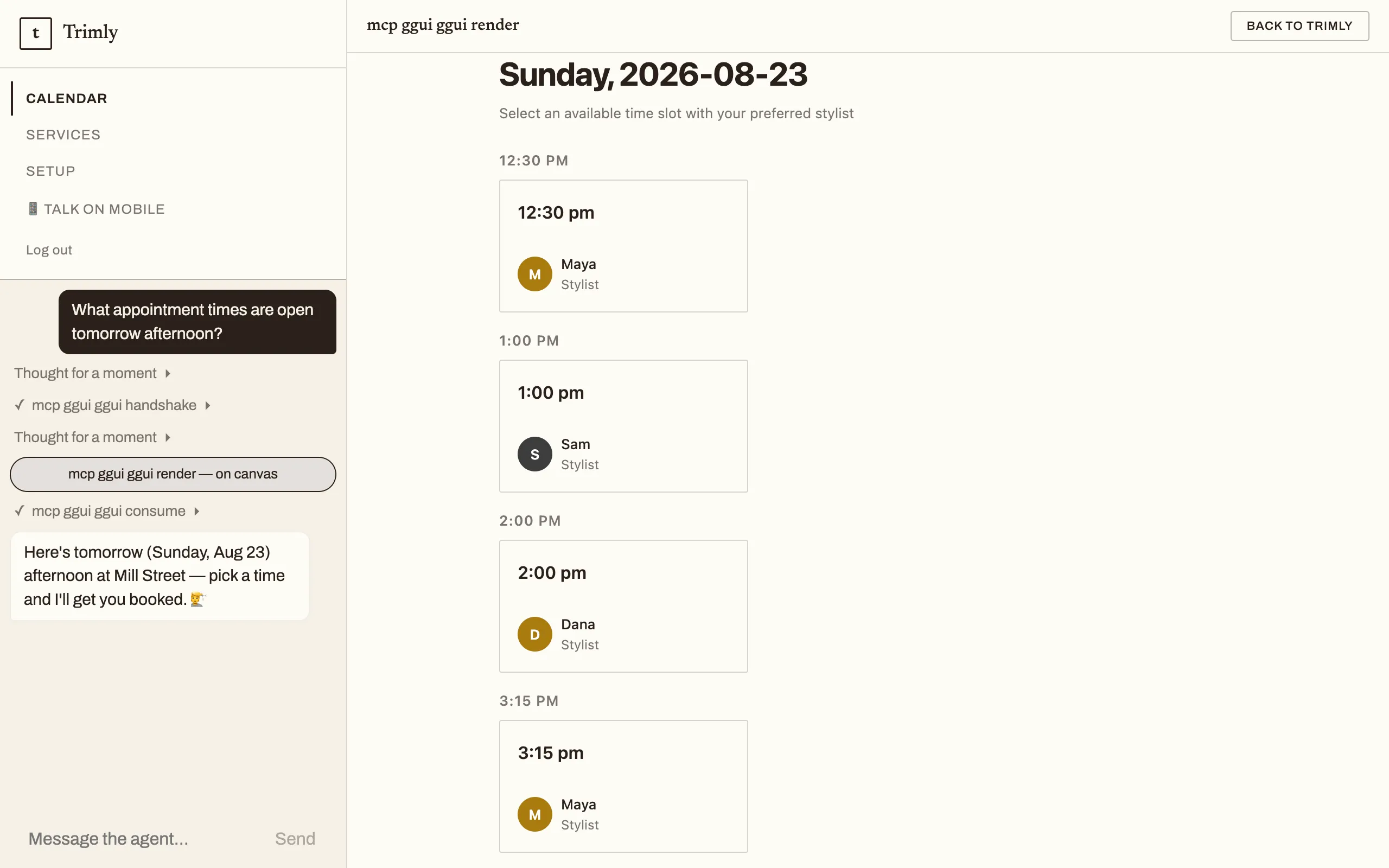
When your agent presents an interactive surface — a generative UI card or canvas — the open panel expands to a near-fullscreen overlay on your page, and returns to the docked panel when the surface is done. The widget never opens itself over your page: only a panel the visitor has already opened can expand. Cards can also carry follow-up action buttons — tapping one stages text into the composer for the visitor to edit and send; it never sends on its own.
Who the visitor is
Section titled “Who the visitor is”Anonymous (the default). Visitors chat without signing in. The widget keeps a per-browser identity in its own storage so a returning visitor continues their conversation; continuity is best-effort (strict privacy modes may reset it). If your agent is set to require sign-in to chat, anonymous embeds can’t chat — use identified embeds instead.
Identified (your own sign-in). If your site has its own logged-in users, the widget can know who they are — giving each visitor durable history tied to their account with you. This mode is configured per app in the console’s Embed tab, and takes three steps:
-
Enrol your app once and store the secret it prints (shown once — treat it like a database password):
Terminal window guuey widget keys create <appId> --audience <your-audience> -
Add a token endpoint to your backend with
@guuey/widget-auth— a zero-dependency package that mints a short-lived token for the currently signed-in user:import { signUserToken } from "@guuey/widget-auth";const { token } = await signUserToken({ userId: session.userId, name: session.name, email: session.email },{ appId: process.env.GUUEY_APP_ID!, appSecret: process.env.GUUEY_APP_SECRET! });// Return the raw token string from your endpoint. -
Point the widget at it. The console’s Embed tab generates the identified snippet, which adds an
identityblock:identity: {getToken: (reason) =>fetch("https://www.example.com/api/guuey-token" + "?reason=" + reason).then((r) => {if (!r.ok) throw new Error("token endpoint failed: " + r.status);return r.text();}),},getTokenis called with areason:"initial"on first need,"expired"when a token has stopped working. If your endpoint caches tokens, always mint a fresh one on"expired".
An app configured for identified embeds fails loudly, never silently: if the identity setup is incomplete, the widget shows a clear notice instead of mounting a chat that would drop your visitors into anonymous threads.
The same token endpoint also signs users into a surface you build yourself on the chat kit or the client SDK — same token, same identity, so a visitor is one person across the widget and your own page.
If your site sets a Content-Security-Policy
Section titled “If your site sets a Content-Security-Policy”The embed needs https://widget.guuey.com in frame-src and connect-src, and a way to admit the loader’s script tag and the one <style> it injects — a host entry under a host-allowlist policy, your page’s nonce under a nonce-based one:
script-src— the loader tag. Under a host allowlist:script-src https://widget.guuey.com. Under a nonce-based policy: put the page’s per-request nonce on the tag (on both tags in the two-script form — the first one is inline). That is what lets the loader run, and no host entry is needed; with'strict-dynamic'a host entry is ignored anyway.frame-src https://widget.guuey.com— the chat panel is an iframe onhttps://widget.guuey.com/w/<appId>;child-srcordefault-srccovers it if you don’t setframe-src.connect-src https://widget.guuey.com— two small requests your document may make to the widget origin: the theme pre-paint on every page view, so the panel opens in your app’s colours, glass and shadow before the frame has loaded, and — only when the panel opens and the frame does not become ready — the embed check that names this page if it isn’t in your allowed domains yet. Both fail soft: without this entry the widget still works, the panel paints when the frame loads, and the not-ready notice stays generic — the browser just logs a blocked request.style-src— the loader injects one<style>element for the launcher and panel and stamps it with the nonce from your tag, so a nonce-basedstyle-srccovers it. A policy without nonces needs'unsafe-inline'here.
The two shapes, written out:
# host-allowlist policyscript-src 'self' https://widget.guuey.com; frame-src https://widget.guuey.com;connect-src 'self' https://widget.guuey.com; style-src 'self' 'unsafe-inline'
# nonce-based policy — the same per-request nonce in the header and on the tagscript-src 'nonce-r4nd0m' 'strict-dynamic'; frame-src https://widget.guuey.com;connect-src 'self' https://widget.guuey.com; style-src 'nonce-r4nd0m'
Nothing else: the launcher icon is an inline SVG path, nothing loads an image or a font into your document, and the conversation itself runs inside the iframe on Guuey’s origin, under that origin’s own policy.
Share links
Section titled “Share links”Every agent can be shared as a hosted chat page — no website required. The console’s Design & distribution page for your agent holds the link and the listing controls.
The link points at guuey’s agent client:
https://app.guuey.com/agent/<app-id>Anyone who opens it gets a full chat with your agent on the web (native mobile apps are on the way).
Two ways to share
Section titled “Two ways to share”- Unlisted link — the agent stays off the public Discover directory (the same surface Portal presents as its Explore tab) and is reachable only by its direct link. Available for any agent.
- List in Discover — the agent is also listed publicly in the Discover directory, where anyone can find it. Public listing is offered only for read-only agents — ones with no connected accounts that could modify data; if your agent gains a connected account later, you’ll be prompted to switch it back to unlisted.
Stop sharing removes the agent from Discover; the direct link and the agent’s page keep working for any live agent, and resuming later restores the same listing. To actually restrict who can chat, turn on Require sign-in to chat (below) — that is the access gate, not the listing.
Require sign-in to chat
Section titled “Require sign-in to chat”Separate from how the agent is listed, you choose whether visitors must sign in before chatting. This is the real access gate — enforced by the agent itself, and it applies to the share link even when the agent is unlisted. Changes take effect within about 15 seconds.
Listing details
Section titled “Listing details”Optionally add a description and category in the Share panel. These appear on Discover cards and the agent’s page once the listing is public and published; they change nothing for unlisted agents.
The agent’s icon — along with the social-share image and accent color — is app branding, not listing metadata: set it in the console under Agent Settings → General → Branding or with guuey apps update --brand-icon-url, and it applies whether or not the agent is listed. The welcome line belongs to the standalone page instead — Agent Settings → General → Standalone page, or guuey apps update --welcome-copy. See Design & distribution.
Troubleshooting
Section titled “Troubleshooting”The widget stays blank or never mounts. Almost always the page’s origin is missing from the app’s allowed domains — the browser refuses the frame by design. Add the exact origin your pages are served from (scheme + host, no path) and verify with guuey apps check <appId> --origin https://www.example.com; a www / apex mismatch is the classic miss.
Visitors see a notice instead of a chat (identified embeds). An app configured for identified embeds refuses to mount an anonymous chat when the identity setup is incomplete. Check that your token endpoint is reachable from the page and returns the raw token string, and that it mints a fresh token when getToken is called with "expired".
Visitors see that the agent is paused. The app’s free trial ended without a plan (or the app was paused). Choosing a plan resumes it automatically within a few minutes — see Plans & billing.
A share link stopped working. Stop sharing only delists the agent from Discover — the direct link keeps working for any live agent, so a dead link means the app was deleted, not unlisted (a paused agent’s page still loads and says it is paused — see the bullet above). To restrict who can chat, use Require sign-in to chat.