Getting started
read as.mdGuuey hosts agents. You describe what your agent should do and Guuey runs it on isolated, always-on infrastructure — conversations stream live, and history is saved for you. There are two ways in: create in the console, or scaffold with code. Both end at the same place — a deployed, live agent.
What you’ll build
Section titled “What you’ll build”An agent on Guuey is a declarative definition: instructions (its system prompt), a model, and its capabilities — including MCP servers it can call. There is no code to write and nothing to keep running yourself.
Create your first agent
Section titled “Create your first agent”- Sign up at platform.guuey.com — sign-up is open, no invite needed. Email and password always work; Google and GitHub sign-in are offered where available. One account carries you across Guuey.
- Create. A fresh account lands on a short onboarding pointed straight at creating your first agent — one create page does the rest. (Building with code instead? The onboarding hands you the CLI path too — see below.)
- Say who it’s for. The first question is Is this agent for you, or for your customers? Just for me is your own assistant: you sign in to use it, and nothing goes on a website. For my customers is a rep for the people you serve, on your website and in Portal. The answer sets the starting choices in the steps that follow; change it and they reset to match.
- Describe it. Write what your agent should do — a short brief is enough, and the template chips give you a starting point. Have a website? Point the form at it and Draft from your site writes the brief from your own pages in seconds — and allows your site’s origin for embedding before you’ve deployed anything. You can also add materials right here — price lists, FAQs, policies: your agent answers from them (they become its resources at create), and drafting reads them too. All of it stays editable before you create.
- Choose who can chat, and where. Guests, signed-in users, or both, and the surfaces your agent meets them on — the widget on your site, its own page, Portal. An agent for your customers starts with guests and signed-in users on the widget and Portal; one just for you starts with signed-in users only, on Portal only.
- Create my agent. Creating deploys: your agent comes up live, with the playground a click away, a ready-to-copy
npxstart command for the code-inclined, and the trial meter in view.
Generative UI is on by default — your agent replies with interactive screens, not just text:
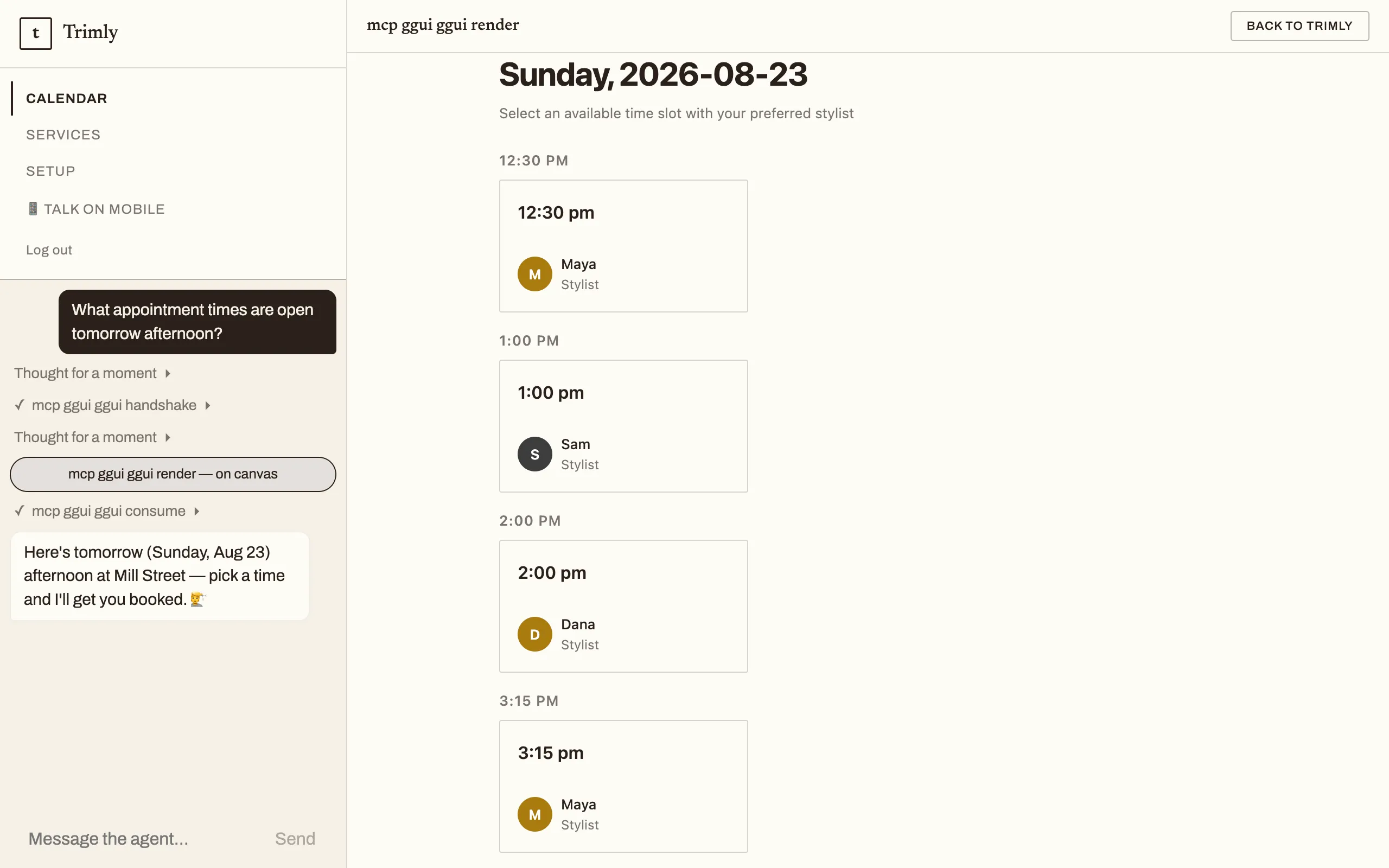
That card is the live Trimly demo answering “what appointment times are open tomorrow afternoon?” — an agent built exactly this way.
Your first deployed app starts a 7-day trial — it runs fully during the trial, then pauses until you pick a plan (your history, settings and domains are kept; choosing a plan resumes it). See Plans & billing for plans, pod sizes, and what happens at expiry.
Test it
Section titled “Test it”The playground talks to your actually-deployed agent — the same live endpoint your users will reach, streaming responses in real time. To change the instructions once it’s live, open the agent’s Behavior page, edit the system prompt, and click Save & redeploy — a new build is live in about a minute. The CLI round-trip still works too: npx guuey pull --app-id <id>, edit prompts/system.md, and npx guuey deploy (see the CLI guide). Either way it is a new build, and nothing about a running conversation is lost. The agent’s Design & distribution page gives you the share link, access controls, and the embed snippet with its allowed-origins list beside it — see the Console guide.
Prefer code?
Section titled “Prefer code?”The console is one of two ways in. Developers can scaffold a code-mode agent — bring Claude Agent SDK, OpenAI Agents SDK, or Google ADK code — run it locally, and deploy it with the CLI. The scaffold runs corepack pnpm install for you (--no-install skips it; if the install can’t run, the scaffold says so and you run it by hand):
npx @guuey/create-agentic-app my-agentcd my-agentpnpm dev      # run locally with hot reload
npx guuey loginnpx guuey deploy  # hosted on Guuey
Run that first deploy from a terminal: it asks for an app name, creates the app and stamps its appId into guuey.json. In CI, or any non-interactive run, pass --app-id <id> instead — the auto-create only fires interactively.
No CLI install and no endpoint setup needed: the scaffold pins @guuey/cli, so in-project npx guuey … runs the matching version — and the CLI talks to Guuey’s production API out of the box. See the CLI guide for the full workflow.
Next steps
Section titled “Next steps”- Follow Your first agentic app — the code path above as a full tutorial, step by step with expected output.
- Read the Console guide for a tour of every screen.
- See Hosting & runtime for how your agent runs — isolation, streaming, plans, and the trial.
- Learn how generative UI works in the ggui docs — the open protocol behind those interactive replies.