Your first agentic app
read as.mdThis is the golden path for building on Guuey with code: scaffold a project, see what you got, run the local stack, then deploy the agent and bind it into its own web frontend. At the end you have a hosted agent — and a product around it that is yours.
1. Scaffold the project
Section titled “1. Scaffold the project”npx @guuey/create-agentic-app@latest my-agent --framework claude-agent-sdkcd my-agentPass --framework explicitly: an interactive terminal prompts for one, but a script or CI run stops with Non-interactive run: pass --framework <f> explicitly. The frameworks are claude-agent-sdk, openai-agents-sdk, and google-adk — this tutorial uses the first. The scaffolder prints the plan the rest of this page walks (with your absolute project path where this shows /path/to/my-agent):
Scaffolded "my-agent" in /path/to/my-agent
Next steps:  cd /path/to/my-agent  pnpm install  pnpm bootstrap        # brand, theme, copy — the web app is gated on this  pnpm dev  guuey login && guuey deploy  pnpm bootstrap -- --link   # bind the deployed app into the frontend
2. Tour what you got
Section titled “2. Tour what you got”The interesting parts of the tree:
guuey.json # the agent definition — what `guuey deploy` shipsprompts/system.md # the system promptsrc/ # agent code: agent-config.ts, worker.tsmcps/todo/ # a colocated MCP server you own (copy it to add your own)web/ # the product frontend — Vite + React on @guuey/chatggui/ # generative-UI config + blueprintsguuey.app.json # frontend/brand config — written by `pnpm bootstrap`AGENTS.md # steering doc for coding agents working in this reposcripts/ # bootstrap.mjs and dev.mjs, behind the pnpm scripts.env.local # LLM key for local dev (ships empty)guuey.json is the heart of it:
{ "schema": "1", "agent": { "mode": "code", "framework": "claude-agent-sdk", "model": "claude-sonnet-5", "systemPrompt": { "file": "prompts/system.md" }, "mcpServers": { "ggui": false, "todo": { "kind": "colocated", "source": "./mcps/todo", "devPort": 6782 } } }, "ggui": { "configFile": "./ggui/ggui.json" }}"mode": "code" means the agent’s behavior lives in src/ and builds into a worker bundle that guuey deploy ships. It declares one MCP server of its own: todo, colocated — Guuey runs it from your source, locally on port 6782. Generative UI starts off: "ggui": false keeps the ggui server away from your agent. This tutorial turns it on, so delete that line now. With it gone, the local dev stack connects your agent to the ggui server it already runs (each turn’s [guuey] mcp endpoints log line lists ggui), and guuey deploy wires the hosted one. guuey.app.json and AGENTS.md already exist at scaffold time, but as pre-bootstrap placeholders ("bootstrapped": false) — the next steps fill them in.
3. Install dependencies
Section titled “3. Install dependencies”pnpm installThe project is pnpm-only. You may see a Warning: Ignored build scripts line from pnpm — it’s benign; nothing in the tutorial needs those scripts. The install also gives the project its own copy of @guuey/cli — that’s what the npx guuey … commands later in this page run, version-matched to the scaffold, no global install involved.
4. Bootstrap the brand
Section titled “4. Bootstrap the brand”pnpm bootstrapThis is interactive — it prompts for the app name, brand, and copy, and the web app is gated on it. To take every default instead:
pnpm bootstrap -- --yes(the -- is required — it’s how pnpm passes the flag through). Either way this phase is purely local — no account, no network, no API key. It writes guuey.app.json ("bootstrapped": true), regenerates the managed block in AGENTS.md, creates a CLAUDE.md, and sets the local ggui theme. The run ends with:
ggui/ggui.json theme mode → light (local preview matches the site).
Configured "my-agent" — guuey.app.json written, AGENTS.md updated.Next: pnpm dev (local stack) · pnpm bootstrap -- --link (bind a deployed app)
pnpm bootstrap -- --check prints a machine-readable JSON of what’s configured and what’s missing, any time, without changing anything.
5. Add a model key for local chat
Section titled “5. Add a model key for local chat”.env.local is pre-created — with empty keys:
# LLM key for local dev — the deployed agent uses guuey's managed broker instead.ANTHROPIC_API_KEY=# Only needed for the openai-agents-sdk template:OPENAI_API_KEY=Fill in your Anthropic API key; leave OPENAI_API_KEY empty — as its comment says, it only matters for the openai-agents-sdk template. The stack boots without a key, but chat fails at the first model call. As the first comment says, this key is for local development only.
6. Run the local stack
Section titled “6. Run the local stack”pnpm devOne command, four processes, one Ctrl-C to tear them all down:
agent http://localhost:6790 todo-mcp http://localhost:6782 ggui http://localhost:6781 web http://localhost:6890The web frontend is on :6890 — open it and chat. The agent is on :6790: GET /readyz answers 200 while it is serving; 503 means it is draining or degraded (retry); a refused connection means it isn’t listening yet, and POST /agent/invoke streams SSE — the same endpoint shape the hosted pod serves, and the dev server prints a copy-pasteable curl example for it. The ggui server (:6781) powers generative UI, and your todo MCP answers on :6782 as a supervised child of the agent process.
Two calming notes: if a port is already taken you’ll get EADDRINUSE — stop whatever holds it (often a previous dev stack). And the dev logs carry a few benign warnings — an in-memory fallback for the render store, the unsandboxed-agent notice above — all normal for local dev.
And the payoff lands right here, on your machine. Ask for something list-shaped — say, “Add three todos: book flights, pack bags, reserve a hotel — then show me my list” — and the reply comes back as a rendered, interactive card, not a text checklist:
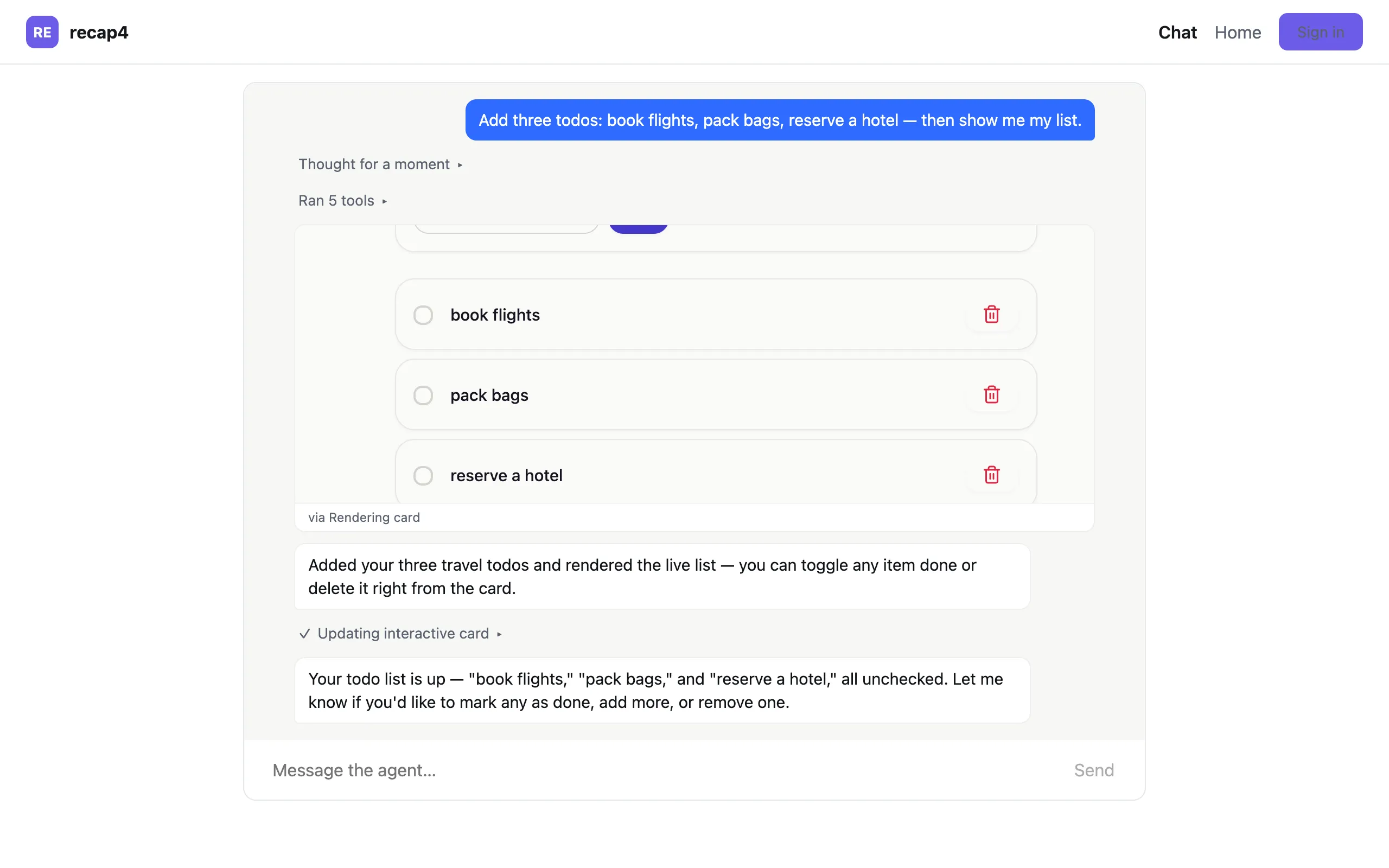
The card is live, not a picture: tap a checkbox to toggle a todo, or the delete control to remove one — the card calls back into your agent and the state changes.
7. Log in
Section titled “7. Log in”npx guuey loginThis opens your browser and delivers an API key back to the CLI. On a remote machine or in CI, the CLI guide covers --no-browser and --token. Check who you are with npx guuey whoami.
8. Deploy
Section titled “8. Deploy”npx guuey deploydeploy detects code mode: it builds your worker bundle and deploys your MCP servers, generative UI registration, and the agent itself in one command, stamping the new appId into guuey.json — it asks for the app name first, which is why this first deploy runs from a terminal; a non-interactive run (CI) passes --app-id <id> instead. Run in your terminal, the first deploy offers to create the app, and the 7-day period starts with that first successful deploy; what it includes and what happens at expiry is on the Plans & billing page. (Scripted and CI runs never create apps; they need an existing appId — see Agents as code.) Once it’s up: npx guuey test "hello" sends a message, npx guuey logs --follow tails the runtime.
9. Bind the app into the frontend
Section titled “9. Bind the app into the frontend”pnpm bootstrap -- --linkThis records the app id (defaulting to the one just stamped into guuey.json), the agent’s endpoint, the widget origin, and the portal link into guuey.app.json, then pushes three things to the platform, in order — the allowed origins you name, the brand accent, and the chat theme document (theme.json, kept in step with guuey.app.json’s mode and accent; every other token in it is yours to edit) — printing ✓ per step or a named refusal, and continuing either way. Two things to expect along the way: a prompt for the allowed origins your frontend will serve from (comma-separated; leave it empty to skip — the script then prints the guuey apps update … --domains command to run later), and a – chat-theme: skipped line in the push report — expected, not an error: the chat theme stays local until the platform CLI grows a flag for pushing it. From here, pnpm status shows the live app state.
What you built
Section titled “What you built”- A hosted code-mode agent on the Claude Agent SDK — prompt in
prompts/system.md, behavior insrc/, defined byguuey.json. - A colocated MCP server (
mcps/todo) deployed alongside it — the pattern to copy for your own tools. - Generative UI from the ggui MCP server, turned on by deleting
"ggui": false. - A branded web frontend (
web/) bound to the live agent. - A local dev stack with pod parity: the same
POST /agent/invokeSSE endpoint locally and hosted.
- Ship a product shell — the
agentic-apptemplate: sidebar dock, fullscreen agent canvas, talk-on-mobile QR. - Start from a real app: Trimly — extract a complete example and re-brand it as yours.
- CLI — the full command surface: sizes, logs, service tokens, environment variables.
- Agents as code — check
guuey.jsoninto your repo and converge it from CI.