Start from Trimly
read as.mdTrimly is a fictional salon-booking SaaS with a real, live agent inside — one of Guuey’s public demos. Instead of starting from a blank scaffold, this tutorial forks that demo: you get its product frontend, its brand config, and its agent as a fresh project of your own.
1. Try the live demo
Section titled “1. Try the live demo”Open trimly.demos.guuey.com and click Enter the demo to talk to the deployed Trimly agent — the exact agent you’re about to fork. Ask it something a card answers better than prose:
What appointment times are open tomorrow afternoon?
The reply doesn’t come back as text. The rail shows the agent at work — by default it keeps the ggui protocol rows (handshake → render → consume) out of view and shows the rendered card; policy={{ tool: { showToolRows: "all" } }} on the rail’s <GuueyChat> brings the chain back, as in the screenshot — and the answer lands on the canvas as an interactive slot picker — real buttons, a stylist on each:
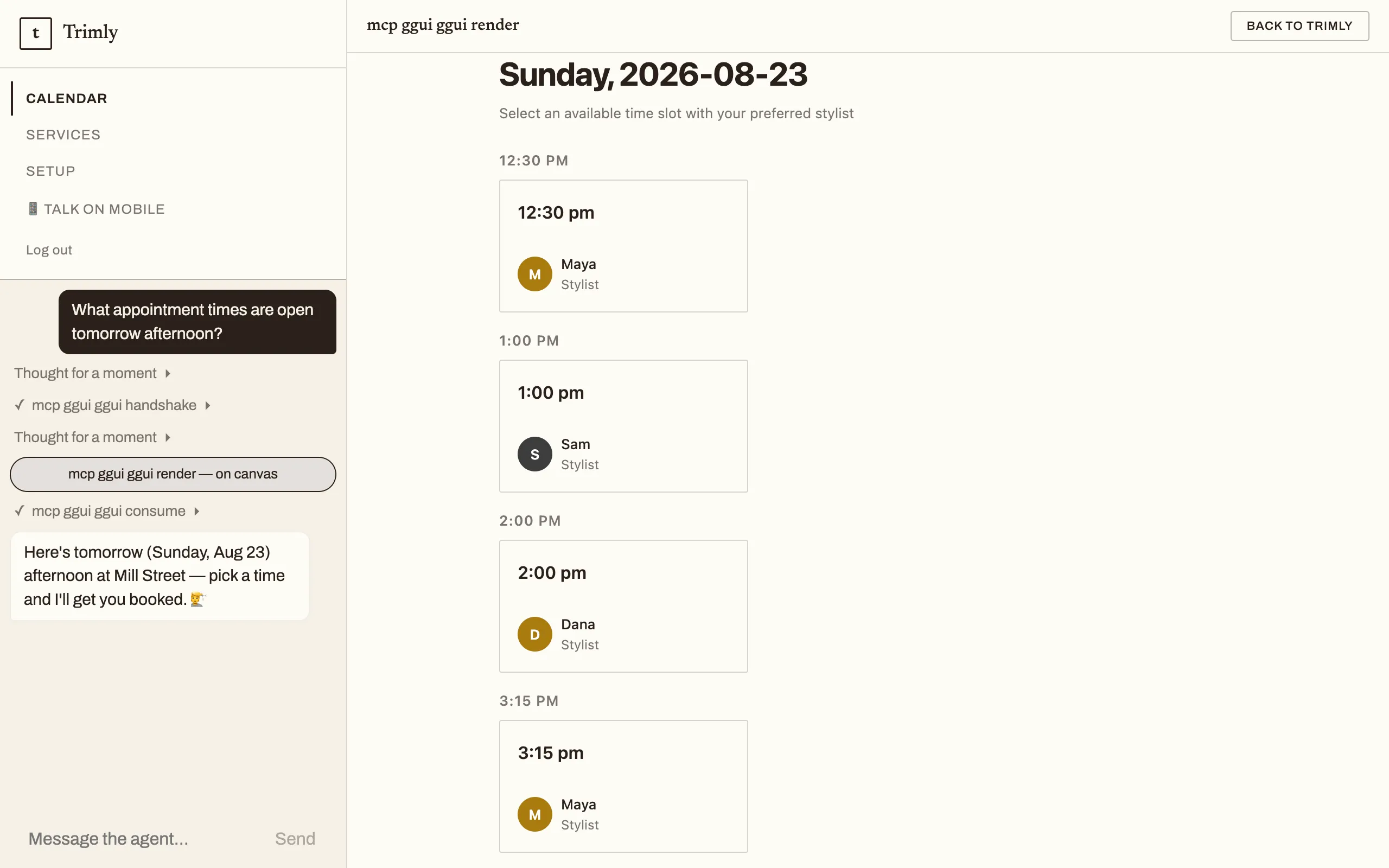
That is the product’s core move — generative UI — and your fork inherits the whole setup.
2. Fork it
Section titled “2. Fork it”npx @guuey/create-agentic-app@latest trimly-fork --example trimly--example fetches the example from the public withguuey/demos repository at run time, so it needs network access. Expected output:
Extracted the "trimly" example into …/trimly-fork
Next steps: cd …/trimly-fork pnpm install pnpm bootstrap # re-brand it as yours (also turns the demo chrome off) pnpm dev3. See what you got
Section titled “3. See what you got”cd trimly-forkTwo things are worth noticing before you touch anything.
It’s a fresh repository. The extraction initializes a new git repo with a single chore: scaffold commit and no remote — this is your project now, not a clone of the demos repo. Add a remote whenever you’re ready.
The agent is two files. The tree (config files trimmed):
ggui/ generative-UI config: blueprints, themesprompts/system.md the system promptscripts/ bootstrap.mjs + dev.mjsweb/ the Trimly product frontend (Vite)guuey.app.json brand, theme, copy — the app configguuey.json the agent definitionThere is no src/ and no mcps/ — nothing to build. Open guuey.json:
{ "schema": "1", "agent": { "mode": "declarative", "framework": "claude-agent-sdk", "model": "claude-sonnet-5", "systemPrompt": { "file": "prompts/system.md" }, "auth": "anonymous", "memory": "thread", "storage": [], "endpoint": { "kind": "invoke", "streaming": true } }}"mode": "declarative" is the teaching moment: the agent is this definition — prompt, model, auth, memory, endpoint — and guuey agent apply ships it as-is, no build step. This is one of the CLI’s two modes; the other, code mode, is what the base scaffold in Your first agentic app uses, with a src/ directory and a worker build. The CLI guide covers how deploy auto-detects the mode; Agents as code covers managing a definition like this from a repo.
Also note what’s absent: there is no mcpServers key, yet the demo renders interactive UI. The ggui generative-UI server is the platform default and merges in automatically — the absence is the configuration. A blank scaffold works the other way: its guuey.json declares "ggui": false, so generative UI starts off there.
4. Change how the agent behaves
Section titled “4. Change how the agent behaves”The agent’s whole personality lives in prompts/system.md — a single paragraph. It begins:
You are Trimly’s scheduling assistant, embedded on a demo page. Visitors are anonymous and just exploring.
Edit it. Rename the assistant, change what it offers, point it at a different kind of business. Because the agent is declarative, editing this file and guuey.json is the entire surface for changing agent behavior — there is no code to touch.
5. Install and make it yours
Section titled “5. Install and make it yours”pnpm installIf pnpm warns about ignored build scripts, that’s benign — the project runs without them.
pnpm bootstrapBootstrap is interactive: it prompts for your brand basics, starting with the app name. It then rewrites guuey.app.json with your name, tagline, accent, and headline, syncs the ggui theme, regenerates the AGENTS.md marker block — and flips demoMode off. It also unbinds the example’s hosted demo app (it prints exactly that): from here, chat in your fork talks to your local agent, not Guuey’s hosted Trimly pod. A bootstrap makes the app yours: with the demo chrome gone, the landing page’s Enter the demo button becomes Open the chat. No account, no key, no network — this phase is purely local.
Prefer defaults? pnpm bootstrap -- --yes skips the prompts (the second -- is required — the first belongs to pnpm). pnpm bootstrap -- --check prints a JSON status without changing anything.
6. Run it locally
Section titled “6. Run it locally”pnpm devOne command, three processes — a declarative fork has no worker build and no colocated MCP server, so the stack is leaner than the base template’s:
agent http://localhost:6790 ggui http://localhost:6781 web http://localhost:6890Open http://localhost:6890 — your re-branded app, demo chrome gone. Because bootstrap unbound the hosted demo app, the chat talks to your local agent on :6790 (GET /readyz answers 200 while it is serving; 503 means it is draining or degraded (retry); a refused connection means it isn’t listening yet, and the boot log prints the same unsandboxed-locally notice the base template’s does). Chatting needs your model key in .env.local — and the payoff survives the fork: ask for tomorrow’s open slots and the local agent runs the same ggui render chain you watched in step 1. Your fork keeps the whole generative-UI wiring.
Prefer plain files?
Section titled “Prefer plain files?”--example is a convenience over a public repo. The manual alternative, from the scaffolder’s own README:
npx degit withguuey/demos/trimly trimly-forkNearly the same files: degit copies the repo’s tracked contents, so no fresh git repo is initialized for you and there is no pre-created .env.local — that file is gitignored (the repo tracks only .env.example; the scaffolder creates the copy for you). Run git init and cp .env.example .env.local yourself — the same copy step the fork README’s quick start shows — then continue from step 3.
Where deploy fits
Section titled “Where deploy fits”The scaffolder’s next steps end at pnpm dev on purpose: your fork is a complete local app, and hosting it is a separate decision. Create the app explicitly with guuey apps create, as your fork’s README shows — for a declarative project, guuey deploy won’t create one for you — and the app’s 7-day trial starts from its first successful deploy; see Plans & billing. When you’re ready, the README’s “Deploying your own” section walks the whole declarative path — log in, create, deploy, then pnpm bootstrap -- --link to bind the deployed app into the frontend, the same binding step Your first agentic app walks through. The login and deploy commands themselves are covered in the CLI guide (in-project npx guuey … runs the fork’s own pinned CLI, no setup), with Agents as code for managing a definition like this from your repo.
What you built
Section titled “What you built”- A fork of a live production demo as your own fresh repository — one scaffold commit, no remote.
- A declarative agent: the whole definition is
guuey.jsonplusprompts/system.md, with generative UI from the platform default. - Your own brand on the app —
pnpm bootstrapre-branded it and turned the demo chrome off.
- Your first agentic app — the code-mode path: scaffold, run, and deploy an agent with a worker build.
- Ship a product shell — the
agentic-apptemplate: sidebar dock, fullscreen agent canvas, talk-on-mobile QR. - Agents as code — manage a declarative definition from your repo, including CI.
- CLI guide — the full command surface, from
guuey loginto custom domains.